.png)


monday Resource Capacity Planning: Consultant-Led Strategies for Balancing Workload View in 2026
- Josh Jebathilak
- Jan 14
- 6 min read


Can growing teams prevent resource bottlenecks with monday.com? Yes, effective monday resource capacity planning can do that and maximise productivity across multiple projects.
Forbes has reported that 82% of a 12,000-person workforce were at risk of burnout. Industry leaders have suggested that improvement in project delivery timelines can significantly reduce this.
Did you know that modern project managers' resource management needs more than just spreadsheets? It demands real-time visibility into availability, team capacity, workload distribution, and more.
Thankfully, monday Work Management has a Workload View that can transform how organisations allocate resources, track capacity, and maintain sustainable work practices. In this blog post, we'll explore consultant-led strategies, implement workload view setup best practices, and more.
monday.com Workload View Fundamentals: What You Need to Know
monday resource capacity planning begins with a 360-degree understanding of how Workload View operates within the platform. It provides a visual capacity management across all departments.
It displays every team member's workloads across customisable time periods. Examples include daily, monthly, or weekly views.
The system also calculates the user capacity based on estimated hours, availability, and assigned tasks. Some of the key components of the Workload View include:
Measuring effort against available working hours with capacity tracking columns.
Colour-coding for visual workload indicators. (Red for overallocated and green for balanced)
Real-time updates that reflect changes as tasks are modified or assigned to each team member.
Analysing capacity across different project phases with time-based filtering capabilities.
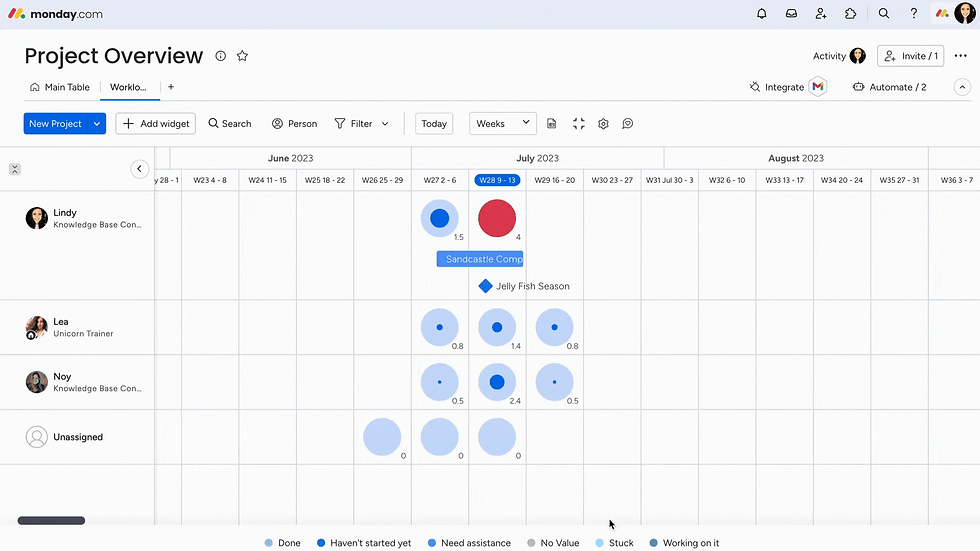
Beyond this, effective workload view setup best practices will need an established baseline capacity metric for each team member. Visual capacity planning can indeed reduce project delays if set up correctly.
As a certified monday consultant, Fruition can help you configure these foundational elements. We'll establish realistic capacity baselines that account for administrative tasks, meeting time, and focused work periods.
monday Resource Capacity Planning: Custom Formulas for Tracking

An advanced project manager will rely on custom formulas within monday.com for resource management. This helps calculate the true capacity from real-time data.
There are formula columns that enable sophisticated workload calculations that go beyond simple hour tracking. Fruition can help you create formulas that factor in priority weighting, task complexity, and individual productivity rates.
Some of the essential formula configurations are:
Buffer time calculations: Ensures teams maintain a sustainable workload throughout every project lifecycle.
Capacity utilisation percentages: Shows actual load vs. the maximum capacity of every team member.
Effort calculation formulas: Combines estimated hours with complexity multipliers.
Burnout risk indicators: Flags every time there are overallocated resources across all departments.
The 27+ monday consultants at Fruition will implement custom formula structures. These will align with your organisational methodology.
For example, Agile story points, Waterfall hour estimates, or hybrid approaches. These ensure the monday resource capacity planning reflects the real-time work patterns rather than the theoretical availability.
Workload View Setup: Best Practices to Implement Time Off and Availability Management
You must account for planned absences, reduced availability periods, and holidays. The timeline and calendar integrations in monday WorkOS enable managers to adjust capacity calculations automatically when users schedule time off.
This will prevent any unrealistic workload assignments during vacation periods. Here are some critical availability management features in monday resource capacity planning:
Flexible working arrangements that accommodate hybrid or remote teams.
Holiday calendars that automatically adjust available working hours.
Time-off tracking that integrates into capacity calculations.
Part-time schedules with customised weekly hour allocations.

According to a Stanford University study, organisations are standing firm on their hybrid or fully remote work policies. That means not accounting for resource planning can lead to project delays.
Thankfully, the monday.com integrations allow administrators to set default working hours per team member. Fruition can help configure these availability parameters during the initial workflow setup.
As a result, our team can establish an automated workflow that notifies project managers when capacity changes. This can be due to time off requests, leading to fewer bottlenecks and proactive reallocations.
How Can You Prevent Employee Burnout Through monday Workload?
In 2025, job burnout was at 66%—an all-time high, even though resource management among project managers prioritised sustainable workload distribution.
monday's Workload View is a solution, as it provides visual indicators when team members exceed a healthy capacity threshold. It's a colour-coded system that highlights issues for proactive intervention for redistribution and stress management.
Some of the burnout prevention strategies in the workload view setup best practices include:
Workload redistribution workflows that automate task reassignment suggestions.
Balance scoring metrics that measure equitable workload distribution across teams.
Capacity threshold alerts that trigger notifications when there's a 90% utilisation.
Trend analysis dashboards can help identify chronically overloaded team members.
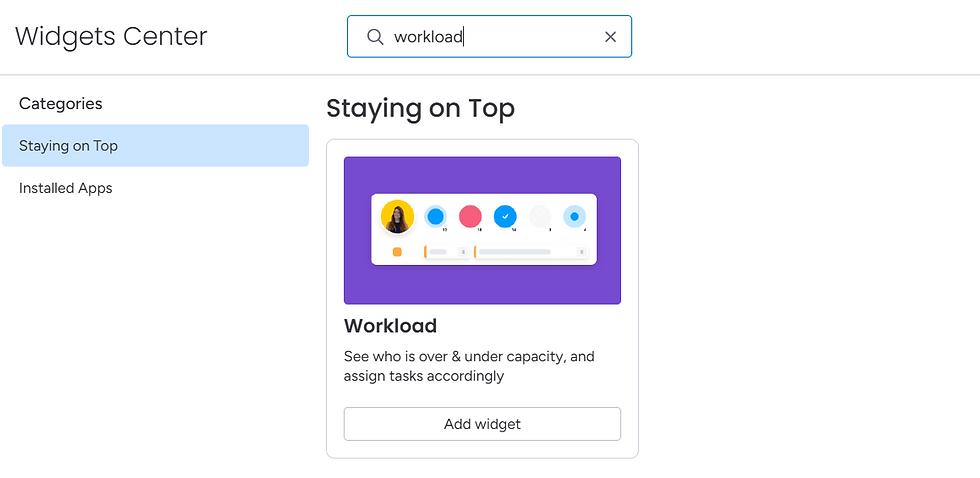
According to Gallup, 76% of employees often experience burnout at their job. That's why implementing proper monday resource capacity planning through Workload View is essential.
This enables managers to keep their team happy and ensures 70% to 85% capacity utilisation. With the monday Workload View, you'll get sustained productivity without exhaustion.
Moreover, the monday automations can trigger reassignment workflows when team members consistently operate above the threshold. This distributes work equitably across the available resources and maintains project momentum.
Advanced Capacity Optimisation Techniques: Workload View Setup Best Practices
A project manager's resource management tactics will require combining multiple strategies to achieve optimal workload balance. Here are some advanced steps to balance complex project portfolios:
Multi-Project Resource Allocation Strategy

Industry leaders believe that organisations with portfolio-level resource visibility achieve better project success rates. monday.com's cross-board connections enable resource managers to visualise team capacity across simultaneous projects.
Workload view setup best practices often extend beyond single-project management to portfolio-level resource allocation. Some of the capabilities include:
Cross-board workload aggregation: Display total commitment across projects.
Scenario-planning tools: Model resource allocation alternatives.
Skills-based assignment: Match team capabilities with task requirements.
Priority-based allocation: Ensure critical projects receive necessary resources.
Resource managers can also use filters to analyse allocation by skill set, project priority, and department with monday resource capacity planning.
Leveraging Automation for Proactive Management
A report by HBR suggests that about 90% of workers trust automation solutions. It maintains optimal workload balance without constant manual intervention.
For example, the monday automation engines trigger capacity-related actions based on predefined conditions. These can occur when team members approach maximum capacity or workload becomes unbalanced.
Some automation capabilities include:
Status updates that change item priorities based on resource availability.
Threshold-triggered notifications that alert when capacity exceeds limits.
Integration workflows that sync time-tracking data with capacity calculations.
Automatic task redistribution that suggests reassignments.
The monday.com consultants at Fruition can design custom automation recipes tailored to organisational workflows. For example, automatically moving low-priority tasks to backlog status when team members exceed capacity. We can transform monday resource capacity planning into a strategic workforce optimisation.
Integrating Time Tracking for Data-Driven Refinement

Did you know that organisations using actual time data can improve estimation accuracy? An effective workload view setup will need feedback loops that compare estimated capacity against actual time spent.
For example, monday.com time tracking integrations can enable teams to log actual hours worked, creating historical data that refines future planning. Some of the benefits include:
Billable hours tracking for client-facing services.
Estimation accuracy improvement through historical comparison analysis.
Project retrospective data that informs accurate future planning.
Capacity model refinement that adjusts individual productivity rates.
Consider this a data-driven approach to monday resource capacity planning that enables project managers to develop personalised productivity profiles. These reflect actual working patterns and optimal workload levels.
Endnotes
Do you want to implement effective monday resource capacity planning through strategic Workload View configuration? Then, you can transform how organisations manage team capacity and prevent burnout.
Follow the workload view setup best practices. These include custom formulas, time-off integrations, data-driven refinement, automations, and more. Moreover, project managers will gain unprecedented visibility into resource allocation across projects.
The result? Balanced workloads, sustainable productivity, and improved project outcomes.
Partner with Fruition's monday consultants to optimise your team's capacity management. We will implement consultant-led strategies tailored to the organisation's unique workflow and resource needs.
FAQs
What is the ideal capacity utilisation percentage in monday.com Workload View?
Most businesses target 75% to 85% capacity utilisation. This allows a buffer time for administrative tasks, meetings, and unexpected priority shifts. It maintains productivity, prevents burnout, and accommodates normal workflow variations.
Can monday.com automatically redistribute tasks when team members are overallocated?
While monday WorkOS cannot automatically reassign tasks autonomously, automation recipes can notify managers of overallocations. The platform can also suggest alternative assignees based on available capacity. But it will require manager approval.
How does monday.com handle capacity planning for flexible and part-time workers?
Administrators can customise weekly working hours per team member in the account settings. Then, the Workload View will calculate capacity proportionally. For example, a 20-hour-per-week employee will show 50% full-time capacity in all workload visualisations and calculations.


