.png)


monday.com for Accounting Firms: Building a Month-End Checklist with Finance Workflow Consulting
- Ishani Dhar Chowdhury

- Feb 26
- 6 min read

Every company in the financial sector is guilty of navigating a chaotic month-end close. How can accounting firms transform it into an error-free, streamlined system?
The answer lies in finance workflow consulting with monday.com. IBM reports that finance teams often spend time on manual data collection during period-end activities.
To solve this, you can combine a robust month-end close checklist in monday with accounting close process automations. Implement a visual workflow platform to automate task sequences, enforce approvals, and ensure consistent compliance deadlines.
In this blog post, we will explore ways to build a comprehensive month-end checklist with monday.com for accounting and finance. Read on if you're ready to reduce closing time and eliminate expensive errors.
What's the Month-End Close Challenge?

For any accounting firm, the month-end closing is the most pressure-intensive period without the right work management tool.
Traditional methods use spreadsheets and email chains. This often led to an increased error risk and a bottleneck.
Ideally, this process involves:
Coordinating multiple team members.
Reconciling numerous accounts.
Ensuring compliance with regulatory standards.
According to Forbes, 50% of finance teams spend more than six days to close their books. This consumes almost 72 business days in a year on repetitive reporting and reconciliations.
monday.com for Accounting and Finance: The Solution

How can monday.com for finance address these challenges? This platform can centralise accounting workflow management with the right visibility across all closing tasks.
To get the most out of this, finance workflow consulting can optimise bank reconciliations, financial statement preparation, and more. For instance, the team can:
Track progress in real time.
Identify delays before they become critical.
Maintain detailed audit trails for compliance purposes.
Collaborating with the right monday.com for finance consultants can help with the accounting close process automation. Fruition understands the unique compliance needs and deadline pressures of all accounting firms. We'll optimise your month-end processes, configure monday.com workflows, and follow industry standards.
Building a Month-End Close Checklist in monday

Industry leaders state that 94% of teams still use Excel for their month-end close methods. About 50% of financial executives believe that this slows them down.
Creating an effective month-end close checklist in monday WorkOS starts with:
Mapping current close processes.
Documenting every task.
Checking every task owner and dependency.
Creating a typical completion timeline.
Why is this different? Well, this foundation avoids data silos and bottlenecks. Here, you can also organise tasks hierarchically.
For example, you can create groups in your monday boards. Finance workflow consulting teams will highlight these major categories:
Journal entries: Depreciation, adjustments, and amortisation.
Pre-close activities: Cutoff procedures and accrual entries.
Reconciliations: Bank accounts, intercompany balances, and credit cards.
Reporting: Financial statements, management reports, and variance analysis.
Review and approval: Partner sign-off and manager review.
Each of the tasks you create (items) should include:
Priority levels.
Status tracking.
Due dates.

The customisable columns in monday.com for finance and accounting can also accommodate specific accounting needs. These include account numbers, supporting documentation links, and materiality thresholds.

Similarly, the Timeline view can visualise the entire 'close calendar.' Dependencies on monday.com can ensure task triggers in proper sequences. For example, financial statement preparations won't kick off until all reconciliations receive approval.
Account Close Process Automations: 3 Types to Know

Automations can transform any WorkOS from a digital task list into an intelligent workflow engine. For example, the accounting close process automation features in monday.com can eliminate manual handoffs, data entry problems, and more.
Here's a complete rundown of ways to configure automations to trigger when conditions are met:
When someone marks a bank reconciliation 'Complete.'
The system will automatically assign the review task to the accounting manager.
When the manager approves it, the next dependent task activates without manual intervention.
Our finance workflow consulting team highlights the following automation capabilities:
Status-Based Automations
Moving items between groups when the status changes.
Sending notifications to your financial team (assignees) when tasks become active.
Escalating any overdue items to accounting supervisors.
Updating dashboards with real-time completion metrics.

Date-Based Automations
Reminders are sent three days before the due dates arrive.
Daily notifications for overdue tasks.
Automatic status updates when deadlines pass.
Approval Workflows
This enforces proper authorisation hierarchies in monday.com for finance teams. For example, multi-level approvals ensure senior accountants review the reconciliations before managers sign off. The system will maintain a complete approval history for audit purposes.
Integration Capabilities
Ideally, the integration capabilities in monday WorkOS connect this platform with accounting software like:
QuickBooks
Xero
NetSuite
For example, reconciliations can be completed in QuickBooks but can automatically get updated on monday.com. If you want sophisticated automation sequences with proper integrations, reach out to Fruition.
Our finance workflow consulting expertise ensures monday.com integrations and automations enhance efficiency without bypassing critical control points. We will build escalation protocols that alert leadership teams during month-end close processes.
How to Leverage monday.com for Finance and Accounting Features for Your Team?
The global accounting services market was valued at USD 682.69 billion in 2025. By 2032, it can reach USD 986.50 billion with a 5.40% CAGR.
Due to this steady growth, your company needs reliable software that specialises in the month-end close checklist and automations. Thankfully, monday.com for finance offers a specialised feature that's particularly valuable for accounting close processes.
monday WorkDocs

The WorkDocs feature creates dynamic documentation that updates automatically. All you have to do is build your close procedures directly in the platform with the right cross-board dependencies and automations.
Financial Dashboard

Overall, the financial dashboard in monday provide executive visibility without needing to micromanage. Hence, partners can view overall close progress, track performance trends across periods, and identify delayed areas.
Customisable Widgets

These display metrics like:
Overdue items by the assignee.
Percentage of completed tasks by category.
Month-over-month cycle time improvements.
Average days to complete reconciliations.
Annotation Capabilities

monday.com for accounting supports collaborative document review. You can upload a draft financial statement where team members can comment and discuss.
Note: For advanced proofing workflows with detailed markup tools, monday.com can integrate with Ziflow or PageProof. This will sync with the approval status on your board.
Time Tracking
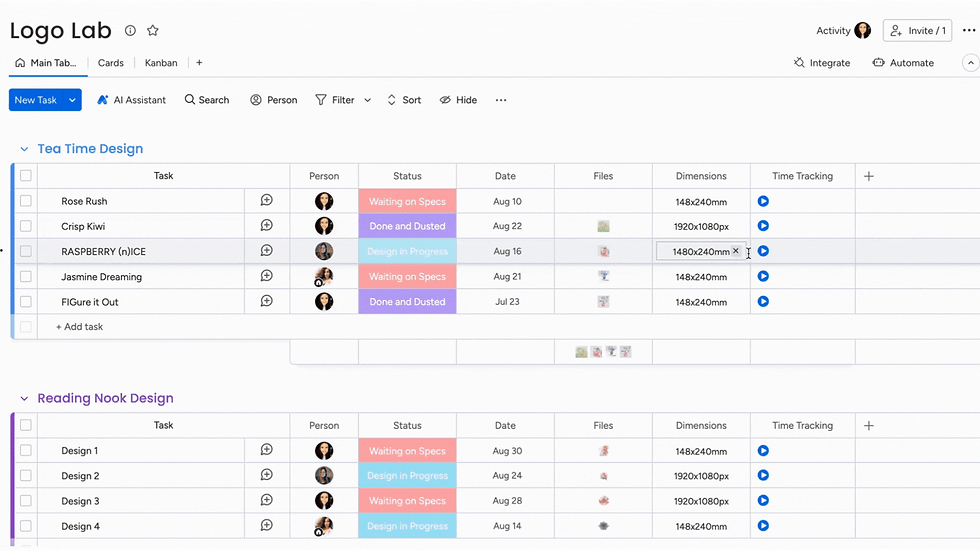
The time-tracking capabilities in monday.com can measure actual hours spent on each task. This helps with resource planning and identifies efficiency improvement opportunities. Remember, compare estimated vs actual time to refine future month-end close schedules.
Apart from all these, the monday WorkOS mobile app helps with remote work flexibility. Teams distributed around the world can respond to questions, access documentation, and update task status.
Finance Workflow Consulting: Creating a Sustainable Continuous Improvement
Let's say you've selected monday.com for accounting and finance to help with your month-end close efficiency. What next?
First, you'll have to choose a monday.com expert with knowledge about the financial industry. The team at Fruition can help you analyse reporting capabilities to identify improvement patterns and change opportunities.
We'll ensure each month-end close checklist in monday is analysed to avoid future bottlenecks. Our team will help you understand the data and use it to determine which reconciliations need earlier start dates, ensure additional preparation time, and more.
Fruition will make quick adjustments to your workflows to meet industry standards. We will preserve customisable templates after a successful month-end process.
Reach out to our finance workflow consulting services for ongoing optimisation support. Our 27+ talented monday.com consultants will help your firm evolve with changing business needs. We will also conduct quarterly reviews to analyse close cycle performance and recommend automation enhancements.
To End With
As you can see, implementing a month-end close checklist in monday WorkOS can transform the accounting process. Gone are the days of a stressful scramble into a controlled and predictable workflow.
Accounting close process automation will eliminate manual coordination. This ensures compliance requirements are met, providing leadership teams with unprecedented visibility.
All in all, finance workflow consulting helps firms design and implement solutions that address specific challenges. Leveraging monday WorkOS ensures fewer errors, faster closes, and more.
Are you ready for your team to focus on value-added analysis rather than administrative tasks? Fruition brings deep expertise in both monday configurations and financial close best practices. We will partner with accounting firms to build sustainable, scalable solutions that drive improvement from the initial setup.f
FAQs
How long will it take to implement a month-end close workflow in monday.com?
Basic monday.com implementations for month-end close workflow setups can take up to 4 weeks. This includes process mapping, board configuration, and team training. However, complex workflows for larger accounting firms can take up to 8 weeks. These companies might have extensive close process automation requirements. Ideally, the timeline depends on firm size and current process documentation.
Can monday WorkOS integrate with existing accounting software?
Yes, monday WorkOS offers 200+ integrations. Finance workflow consulting for monday.com includes creating an entire ecosystem with major accounting platforms. Examples include Xero, NetSuite, QuickBooks, and more. You can also use custom integrations through the monday API to virtually any financial system. This enables automated data syncs and status updates.
What happens if finance team members don't adopt the new monday.com system?
Successful adoption requires executive sponsorship and comprehensive training. Your team must also demonstrate clear benefits. The right finance workflow consulting firm for monday.com can help. They'll start with power users to navigate the monday.com interface and minimise learning curves. The monday experts will track usage metrics and provide ongoing support.


