.png)


monday CRM Integration Training for 2026: A Guide for Outlook, Gmail, and More
- Ishani Dhar Chowdhury

- Jan 9
- 6 min read

Is your sales team still copying and pasting emails between platforms? Reports suggest that companies lose between 20% and 30% of their revenue every year due to inefficiencies and lost knowledge.
To solve this, tools like monday CRM come with more than 200 pre-built integrations. This platform will connect seamlessly with your existing tech stack.
However, monday CRM integration training is necessary to maximise productivity across connected platforms. It's a two-way sync with email sequence setup and cross-tool collaboration, ensuring improved data integrity.
In this blog post, you'll learn how proper monday CRM training transforms Gmail and Outlook integrations into seamless workflows.
monday CRM Integration Training: Understanding the Foundation
A successful training should begin by establishing clear learning objectives for your team. It will focus on how monday Sales CRM connects with existing email platforms and communication tools.
The team at Fruition believes that organisations need a structured program to address daily workflow applications and technical setups. It should include an understanding of the following parameters:
Data mapping needs for seamless information flow.
Automation triggers to reduce repetitive manual tasks.
monday API connections between the CRM tool and email clients.
Permission settings to maintain security and privacy across platforms.
As monday.com experts, we want to emphasise that foundational monday CRM integration training helps prevent common mistakes. Your sales team can grasp core concepts early and adapt faster to advanced features. We also offer training programs that include hands-on exercises that mirror real-world scenarios.
Gmail to monday CRM Automations: Setting Up for Maximum Efficiency

When you connect your Gmail account to monday CRM, you create an automation process that can transform how sales teams manage customer communications. This connection will allow emails to automatically create leads, update deal stages, and trigger follow-up sequences.
As a result, it eliminates the need for manual CRM updates after every client interaction. Some of the key automation workflows include:
Archiving completed deal correspondence for compliance purposes.
Syncing contact data bidirectionally between Gmail and monday CRM.
Converting important threads into items automatically.
Triggering task creation based on specific email senders or keywords.
The Gmail to monday automation training should demonstrate how to set up filters that capture relevant emails without cluttering the CRM. monday users will have to learn which Gmail labels trigger specific actions.
This two-way sync capability allows teams to send emails directly from monday CRM while maintaining Gmail accessibility. Any monday CRM integration training will include scenarios for handling edge cases, like duplicate contact prevention.
When configured correctly, this integration can save sales representatives about 10 hours every week on administrative tasks.
Outlook Integration Best Practices: A Guide for Enterprise Teams

We've noticed that Microsoft Outlook remains dominant, especially in enterprise environments. Therefore, there are a few critical adoption metrics and training agendas to follow.
For example, you must address the unique calendar integration, meeting scheduling features, and the entire MS 365 ecosystem. Beyond that, enterprises require robust security protocols along with functionality.
Some of the Outlook integration best practices include:
Mapping Outlook contact fields to corresponding monday CRM properties.
Creating email templates within monday CRM for consistent outreach.
Configuring OAuth authentications for secure connections.
Establishing calendar sync rules that respect privacy settings.
You should learn ways to leverage Outlook's shared mailbox functions with monday CRM's collaborative feature. The monday CRM integration training should cover how meeting notes automatically populate CRM records after calendar events conclude.
The Outlook and monday CRM integration also allows tracking when emails are opened, clicked, and responded to. All that appears as a visual data representation in monday.com's analytical dashboard. Therefore, you must understand permission hierarchies to prevent unauthorised access to sensitive client data.
Integrating Gmail and Outlook with monday CRM: A Step-by-Step Guide
In this monday CRM integration tutorial, we'll discuss ways to connect Gmail and Outlook with monday CRM. Integrating your email platforms with this tool requires easy configuration steps.
For Gmail to monday automation integration:
Navigate to monday CRM settings or go to monday Marketplace.
Select 'Integration' or search for 'Gmail.'
Click 'Connect' or choose 'Use App.'
You'll also need to authorise monday CRM to access the Gmail account through Google's OAuth authentication. Select which email folders will sync automatically to your CRM.
For Outlook integration:
Access to the monday CRM marketplace.
Install the Outlook add-on.
Sign in using your MS 365 credentials.
Establish a connection and allow permissions.
You can also configure field mapping to align Outlook contacts. Set calendar sync preferences to create CRM activities from meetings.
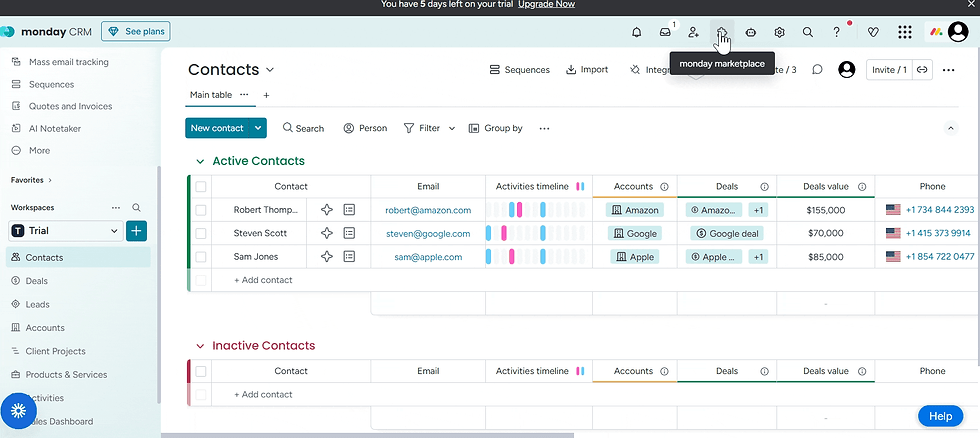
The team at Fruition will help you define automation rules for email-to-item conversion. We'll also set up two-way contact sync. From there, our monday.com consultants will configure notification preferences. Before handing it over, we'll test the connections with sample emails.
How to Ensure Data Integrity Across Connected Systems?
Data integrity forms the backbone of successful cross-tool workflows in any CRM ecosystem. Therefore, monday CRM integration training programs must emphasise validation rules, audit trail monitoring, and duplicate prevention.
Without the right protocols, synchronised systems can still lead to errors across multiple platforms. Some of the essential components include:
Duplicate detection algorithms to identify potential conflicts.
Regular data audits comparing records across connected platforms.
Field mapping verification during maintenance and initial setup.
Error logging systems that alert administrators to sync failures.
The monday experts at Fruition will help you establish primary data sources for specific information types. For example, contact phone numbers might originate in Outlook, but deal values can get updated in monday CRM.
We'll establish clear protocols for resolving conflicts when contradictory data appears across systems. Understanding these will help your sales team recover quickly from mishaps. We recommend a quarterly data integrity review to avoid small issues and ensure reporting accuracy.
Advanced Email Sequence Setup and Workflow Automation

One of the most powerful features in monday CRM is the email sequencing option. These automated workflows nurture leads, re-engage cold prospects, and follow up on proposals.
Your monday CRM integration training must cover sequence logic, personalisation tokens, and performance optimisation. Some of the capabilities include:
A/B testing functionality for subject lines and content variations.
Time-delayed follow-ups based on recipient behaviour and engagement.
Conditional branching that adapts messaging to prospect actions.
Integration with calendar tools for automated meeting booking.
Fruition will help you create email sequences for various customer journeys. That'll last from initial outreach through post-sale onboarding.
Troubleshooting Common monday CRM Integration Errors
Even with proper setups and training, integration sync errors occasionally disrupt workflows between email platforms and monday CRM. Most sync failures stem from authentication timeouts, rate limit violations, field mapping conflicts, etc.
Frequent troubleshooting scenarios include:
Expired OAuth token that requires reauthentication through platform settings.
Missing emails due to folder exclusion rules or spam filters.
Duplicate contact creation from an inconsistent email address format.
Delayed sync caused by a high email volume that exceeds API limits.
When these happen, you must verify your integration status in monday CRM. Also:
Check whether the email filters are blocking important messages.
Review field mappings to ensure data types match between platforms without conflicts.
Clear your browser cache if the integration dashboard displays outdated information.
All in all, a comprehensive monday CRM integration training can help transform disconnected tools into a unified productivity ecosystem. Teams that master Outlook or Gmail to monday automations gain a competitive advantage through enhanced efficiency.
Ready to optimise your monday CRM integrations? Partner with Fruition to develop customised training programs that deliver measurable results across organisations.
FAQs
How long does it take to train a team on monday CRM integrations?
Usually, you'll find that most teams get comfortable within 2 to 3 weeks. It's best to start with 4-6 hours of monday CRM integration training to cover basics and then add advanced sessions later. Quarterly refreshers also help everyone stay updated.
Can monday CRM integrate with email platforms beyond Gmail and Outlook?
Absolutely, Apple Mail and Yahoo work well too. Make.com or n8n can connect to almost any email app you're using. Your developers can build custom connections for specialised systems if needed.
What security considerations should organisations address during integration training?
Focus on OAuth authentication and permission settings first. Your team needs clarity on GDPR requirements for automated emails. Regular audits will also catch issues before they become workflow problems.
What happens when multiple team members sync the same email account?
Conflicts in monday CRM happen less than you'd think. The app tracks which user synced each email first. Set clear ownership rules during training to avoid duplicate entries and confusion.


