.png)


monday Automation Secrets: Advanced Workflows Only Consultants Know [2025]
- Josh Jebathilak
- Sep 15, 2025
- 4 min read


Let's be real. Most teams are barely scratching the surface of what monday automations can actually do.
Harvard Business Review suggests that this SaaS tool feature can drive business growth and efficiency. For instance, 90% of users have mentioned that automations increased productivity.
While everyone's setting up basic task boards and due dates, certified monday.com professionals are building unparalleled automation systems. The sad part? Most monday.com users are oblivious about some advanced techniques.
I'm here to change that. Let's dive deeper into the monday automation secrets.
#1. Cross-Board Automation

Most users create automations within single boards. That's how it should be, right?
Actually, professional monday.com implementation specialists can build cross-board automation networks. It can transform entire business operations with a few clicks.
At Fruition, we helped BL Air Conditioning achieve its 17x ROI breakthrough with:
Multi-board project tracking: A project moves to "In Progress" on the main board. Our monday.com experts created an automation workflow to automatically create sub-tasks across quality control, documentation, and client communication boards.
Resource allocation automation: We created a monday automation to trigger capacity for staff assignments to update across multiple department boards simultaneously.
Client notification cascades: Our certified monday.com consultants created automations for status changes to flow through project boards, CRM systems, and external client portals.

The result? 25% to 30% productivity increase in automated processes. The company also managed to save 540 hours annually.
#2. API Integration Secrets

Did you know that only 4% of companies have reached a fully automated and digitised workplace? That means there's a massive opportunity hiding in plain sight.
It's not about whether you can automate workflows. Instead, it's about how you do it. That's where monday.com platform experts really shine.
monday.com integrations go beyond simple app-to-app connections. At Fruition, our monday.com consultants can use API features to interact with your workflows, power integrations, and automate processes.
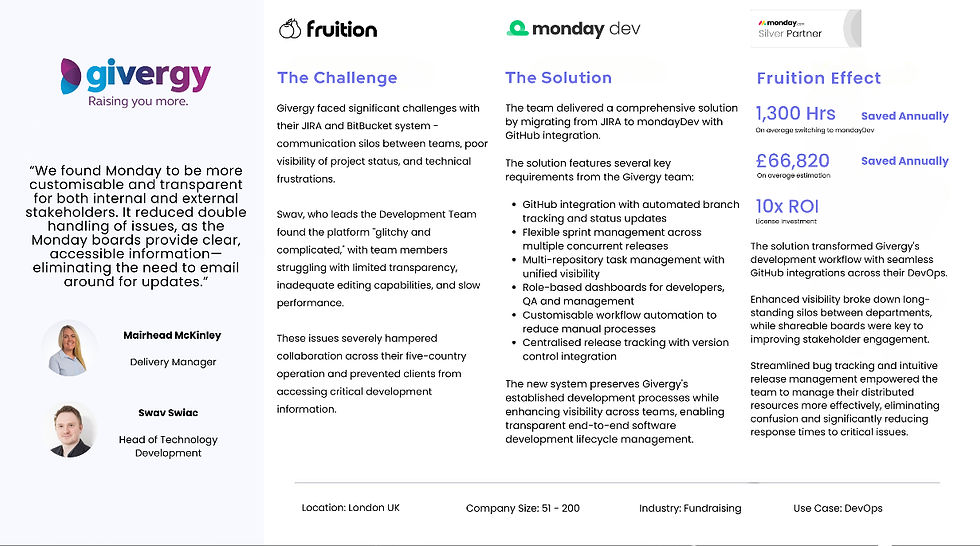
Givergy faced significant challenges with its JIRA and BitBucket systems. There were communication silos between teams with poor project status visibility and technical frustrations. Fruition stepped in to help.
Kevin's team knew that they needed more than basic integrations. Our monday.com experts delivered a comprehensive solution by migrating from JIRA to monday Dev with GitHub integration, creating:
GitHub integration with automated branch tracking: Code commits automatically update project status and sprint boards.
Multi-repository task management: Unified visibility across multiple concurrent releases.
Role-based dashboards: Developers, QA, and management getting customised workflow views
Centralised release tracking: Version control integration streamlines their distributed team operations.
The result? 1,300 hours saved annually and enhanced visibility that broke down silos between their five-country development operation.
#3. Advanced Notification Systems
Most monday.com users send too many notifications. This can overwhelm your team, leading to a dip in productivity.
monday consultants can help you send the right notifications to the right people at the right time. That means we can create automations that actually matter. Here are some of our professional notification strategies:
Context-aware alerts: Notifications that include relevant data from multiple boards.
Escalation sequences: Automatic manager involvement when tasks remain stuck.
Predictive notifications: Alerts sent before deadlines become problems.
These smart notification systems, built by monday.com experts, can impact error reduction rates as compared to manual processing.
#4. Time-Tracking Automations

Currently, the workflow automation market is expected to reach USD 37.45 billion by 2030, growing at a 9.52% CAGR. While monday.com isn't known for its time-tracking feature, it can still be an invisible productivity boost.
monday.com certified professionals build time tracking with automations that work perfectly:
Status-based time logging: Moving tasks to "In Progress" automatically starts timers.
Project phase transitions: Time automatically allocated to correct budget categories based on task types.
Capacity planning integration: Historical time data feeding future project estimates.
#5. Automations in the monday.com App

There are over 245,000 monday.com users. Most of them overlook the mobile advantages of monday automations.
monday.com automation experts optimise for mobile-first business processes, especially if you have on-site teams:
Field update automations: Site visits automatically update project status and trigger next steps.
Mobile approval chains: Managers approving projects and budgets from anywhere.
Location-based triggers: Geographic check-ins automatically update relevant boards.
Why monday.com Professional Help Matters?

Salesforce reports that companies use multiple applications. However, 70% of them remain disconnected from one another.
Many struggle with integrating automation tools into existing systems. Thankfully, monday.com experts can help with both. They will bring:
Strategic automation planning: Building workflows that scale with business growth.
Integration expertise: Connecting monday.com with existing business systems seamlessly
Performance optimisation: Fine-tuning automations for maximum efficiency.
Team training: Ensuring organisations can maintain and expand their automated systems.
At Fruition, we've helped companies achieve 17x ROI and save 540 hours yearly through strategic monday.com implementations. And we didn't do that in a day.
Our professional monday.com setups range from seven days to six weeks. The proven approach includes:
Audit existing workflows: Understanding current processes before automation.
Identify automation opportunities: Finding the highest-impact automation possibilities.
Build incrementally: Starting with core workflows and expanding strategically.
Monitor and optimise: Continuously improving automation performance.
Are you ready to unlock the hidden automation potential with monday.com experts at Fruition? This post represents the beginning of what's possible with professional implementation.
Monday Automation Secrets FAQs
How can multi-step automations be set up in monday.com?
Multi-step automations in monday.com allow users to combine multiple triggers and actions. You can turn them into one seamless recipe, enabling automatic project handoffs, approvals, and escalations within the same workflow. Examples include updating statuses, assigning owners, and setting reminders. This is a monday.com professional setup that simplifies collaboration and minimises manual follow-up for larger teams and multilayered projects.
What strategies help maximise efficiency and avoid hitting monday.com automation action limits?
The monday.com team sets monthly usage limits on automation actions for each account. It varies depending on plan type. monday consultants recommend monitoring automation usage, combining similar triggers into one recipe, and choosing bulk actions to reduce necessary activity. It maintains smooth workflow execution and avoids unexpected pauses by regularly optimising automations and reporting.


