.png)


Cross-Functional Product Collaboration in monday: Can You Connect Dev, Marketing, and Design Workflows in 2026?
- Ishani Dhar Chowdhury

- 8 hours ago
- 6 min read
Is cross-functional product collaboration possible in monday.com?
Yes, you can solve the handoff gap between development, marketing, and design teams with monday WorkOS. The cross-functional project collaboration feature in monday includes the Connect Boards Column, Mirror Columns, and cross-board automations.
For example, the Connect Boards Column will link items across different boards. This supports an optional two-way connection. That means changes to Board A can automatically update connected items in Board B.
When it comes to product-to-marketing handoff automation, choose cross-board automation recipes. These can trigger actions across boards, such as 'creating items on another board when status changes.'
To support monday Dev design workflow integrations, users can sync selected epics into a new project entity on Work Management. This will operate as a one-way sync and not a bidirectional connection.
With it, you can reach engineering milestones and eliminate manual cross-departmental follow-ups. All that bridges the gap between marketing launch, design approvals, and sprints.

What happens when your teams work in disconnected silos? Your product, development, design, and marketing teams won't be on the same page.
The result? Launches get delayed, and handoffs are fractured at every stage. With cross-functional product collaboration in monday, you can solve this once and for all.
The McKinsey Global Institute reveals that fully implementing social collaboration tools will raise a knowledge worker's productivity by 25%. Even then, enterprises still operate across fragmented systems with no shared source of truth.
With monday WorkOS, you can benefit from a connected layer of boards, automated workflows, Mirror Columns, and more. Gone are the days of chasing updates across stand-ups and emails.
Teams can now architect reliable product-to-marketing handoff automations that fire whenever a sprint status changes or a design reaches approval. You can also get portfolio-level visibility with monday Dev design workflow integration.
In this blog post, we'll learn more about monday.com cross-functional product collaborations.
Do Cross-Functional Teams Break Down Before Launch?
Product launches won't fail due to bad ideas. They'll fail because:
Your design team never knew the sprint had closed.
The marketing team was waiting for handoffs that never triggered.
Your development team was already three features ahead.
This right here is the silo problem.
Gartner reports that high collaboration drag is 37% less likely to exceed profit or revenue objectives. To align goals and communication, what should you do?
It's exactly what cross-functional product collaboration in monday is architected to solve. Use the set of native features to connect the Product Backlog, Development Sprints, Design Approvals, and Marketing Launch.
This won't be with workarounds, but purpose-built board architectures. Before configuration, you must understand which tools do what and where the real boundaries lie.
Reach out to a monday.com consultant at Fruition for this. We'll build workflows that your team will actually use across different departments. Our monday experts have helped clients save between 260 hours and 1,440 hours per year.
The Foundation: Connect Boards, Mirror Columns, and More in monday.com
How to ensure cross-functional product collaboration in monday? You'll need the Product, Design, Dev, and Marketing teams to share live data.
This has to be done without duplicating it across systems and chasing manual updates. The solution? The Connect Boards and Mirror Column.
Link items across different boards with Connect Boards. This will be useful when workflows involve interrelated boards. Examples include the Product Backlog and Design Approval tracker operating in parallel.
When setting up a connection, the team at Fruition believes you should choose between:
One-way sync: Data displays on boards where the columns are created. However, changes won't flow back to the source board.
Two-way sync: Changes made on either board will be reflected in both. This eliminates the need to duplicate data manually and ensures live bidirectional visibility.
Mirror Columns: Get Live Data Across Team Boards

The Connect Board Column is in place, right? The Mirror Column will surface the right data where each team needs it without switching between boards or re-entering anything.
Use cases include:
Product → Design: Mirror the sprint priority column from the Product Backlog into the Design Approval board. Designers will always know which features are the highest priority.
Design → Dev: Mirror the design approval status into the Dev Sprint board, so developers have live visibility of what has cleared design sign-off. This supports Dev design workflow integration.
Dev → Marketing: Mirror sprint completion status into the Marketing Launch board to give marketing teams real-time launch readiness data. With this, you can feed product-to-marketing handoff automations.
Connecting monday Dev to Work Management Portfolio
Does your organisation have a unified view across waterfall and agile teams? Cross-functional product collaboration in monday makes this possible.
How? That'll be through a dedicated Agile Portfolio Project feature. It's available in monday Dev for users who also hold Work Management seats in the Enterprise plan.
monday Dev users create Agile projects from selected epics. Then, these will be synced and copied into new project entities on monday Work Management.
The setup steps include four sequences:
Name the project and select which epic board to track.
Choose specific epics from the Dev board to include in the portfolio.
Match epic columns to Work Management project columns for structural alignment.
Map status labels using a drag-and-drop tool to match Dev epic labels to default Work Management project statuses.
The project will now appear directly in the workspace. You can add epics through Edit Project. Moreover, to complete this Dev design workflow integration, merge projects into the portfolio board.
Product-to-Marketing Handoff: Automations Lead The Way
Forbes highlights that automation is no longer a buzzword. It has become a tool to improve efficiency and quality.
In cross-functional workflows, a friction-prone moment would be during the handoff. When a sprint closes/design gets approved, the marketing team is rarely notified.
That's why product-to-marketing handoff automations become mission-critical.

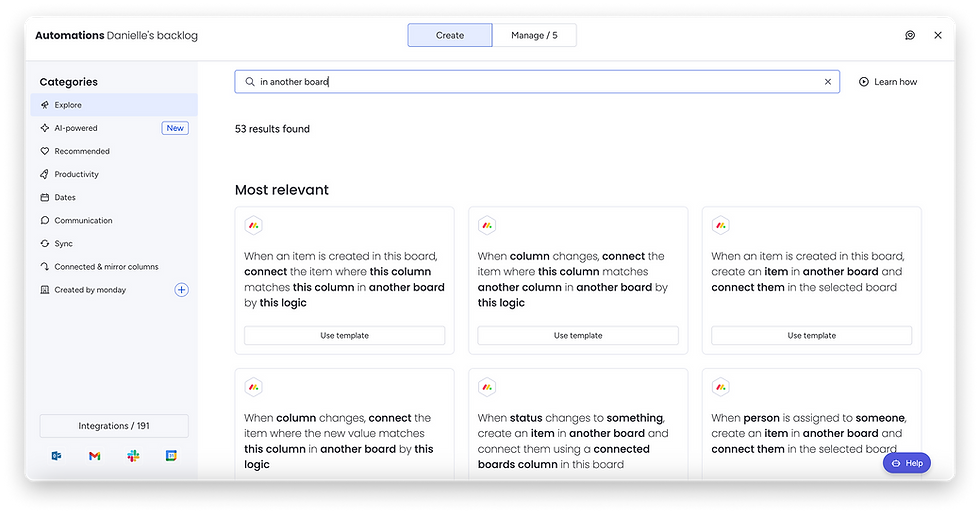
What are cross-board automation recipes in monday.com? These allow teams to trigger actions across boards.
Example: Creating an item on another board when the status changes. This will be with column values from the origin board mapped automatically to the receiving board.
Design marked 'Approved' = automation fires and creates a corresponding launch task on the Marketing Board. Here are some use cases of the product-to-marketing handoff automations:
Status-triggered item creation: A "Ready for Launch" status on the Dev Sprint board creates a new campaign item on the Marketing board. This will come with mapped priority, owner, and timeline columns.
Match automations: Items are linked across boards when column values are identical. This connects matching data points using a Connect Boards Column, keeping product specs and campaign briefs in sync.
Notification automations: When a status changes on any connected board, specific people or entire teams are notified instantly. This is fully customisable per workflow.
Connecting monday Work Management to monday Dev
Here's the thing: Your engineering team operates on monday Dev. However, product, marketing, and design operate on monday Work Management. Without proper configurations, a structured bridge will exist.
Solution: monday Dev users create an Agile project from selected epics. These can then be copied into a new project entity on monday Work Management for proper sync.
However, this is a one-way sync between the two. Data will only flow from monday Dev to Work Management.

What happens when you want to shift your design workflows into monday Dev from Work Management? Two official migration paths include the following:
Move boards as-is: Existing boards are moved directly into monday Dev with all automations, views, and integrations intact. Features like Agile Insights, Sprint automations, and the Engineering Performance Dashboard must then be added manually afterwards.
Rebuild on monday Dev: Boards are reconstructed using monday Dev's default structure with all columns, groups, and items migrated fresh. Up to 500 items can be moved in bulk once a test item is confirmed to have been successfully transferred.
The Bottom Line
It's true: Breaking down silos is no longer optional. It's existential.
Reports suggest that about 75% of cross-functional teams are dysfunctional. The reason? Absence of shared language and processes between design, business, and development teams.

Now, cross-functional product collaboration in monday directly addresses this gap. This platform connects boards, automates status-driven handoffs, and gives every team member a single source of truth.
For example, set up product-to-marketing handoff automations for accuracy. Also, the monday Dev design workflow integration reflects a one-way sync.
Are you ready to solve the handoff gap? Don't configure all that alone.
Fruition has delivered 700+ projects with 35+ certified experts. Being a monday Platinum Partner, we can help build collaborative workflows, automations, and integrations.
FAQs
Does cross-functional product collaboration in monday disrupt individual team workflows?
No, monday.com won't disrupt existing workflows if you add new ones. This platform supports cross-team execution, project plans, and portfolio-style oversight. Every team member will get clear ownership and visibility to maintain their preferred workflows with a single system.
Can external stakeholders participate in cross-functional workflows in monday.com?
Yes, you can add guest users on Standard, Pro, and Enterprise plans. Invite them to specific boards without counting seat limits or giving access to the full workspace. Ensure they can see and edit all boards involved in this sync.
Is monday Work Management a good cross-functional collaboration tool?
Yes, monday Work Management can help keep all your teams connected in a single platform. It was also recognised as a Leader in the Gartner Magic Quadrant for Collaborative Work Management and Adaptive Project Management.

